 The table below shows the differences between the three [Epson TM-U220][1] models. Give us a call if you have questions or need help with your purchase. Call 800.903.6571 or email [email protected].
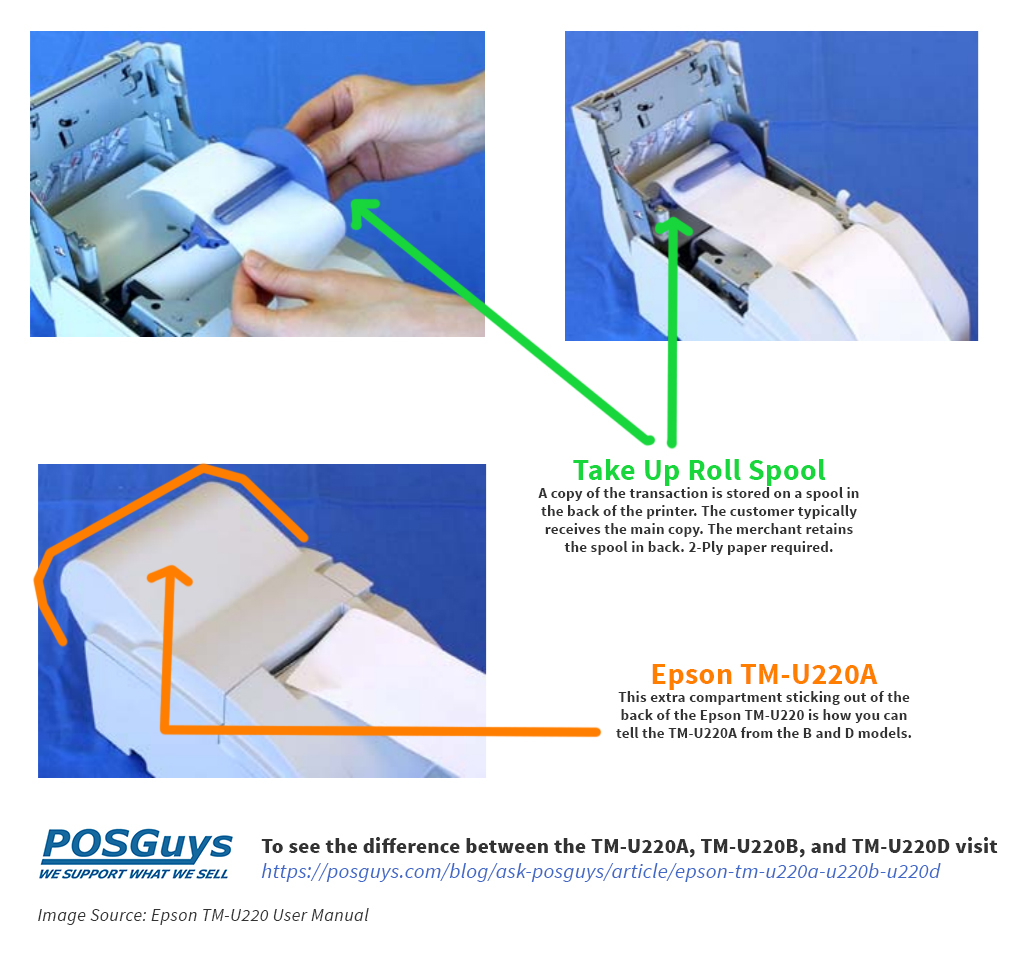
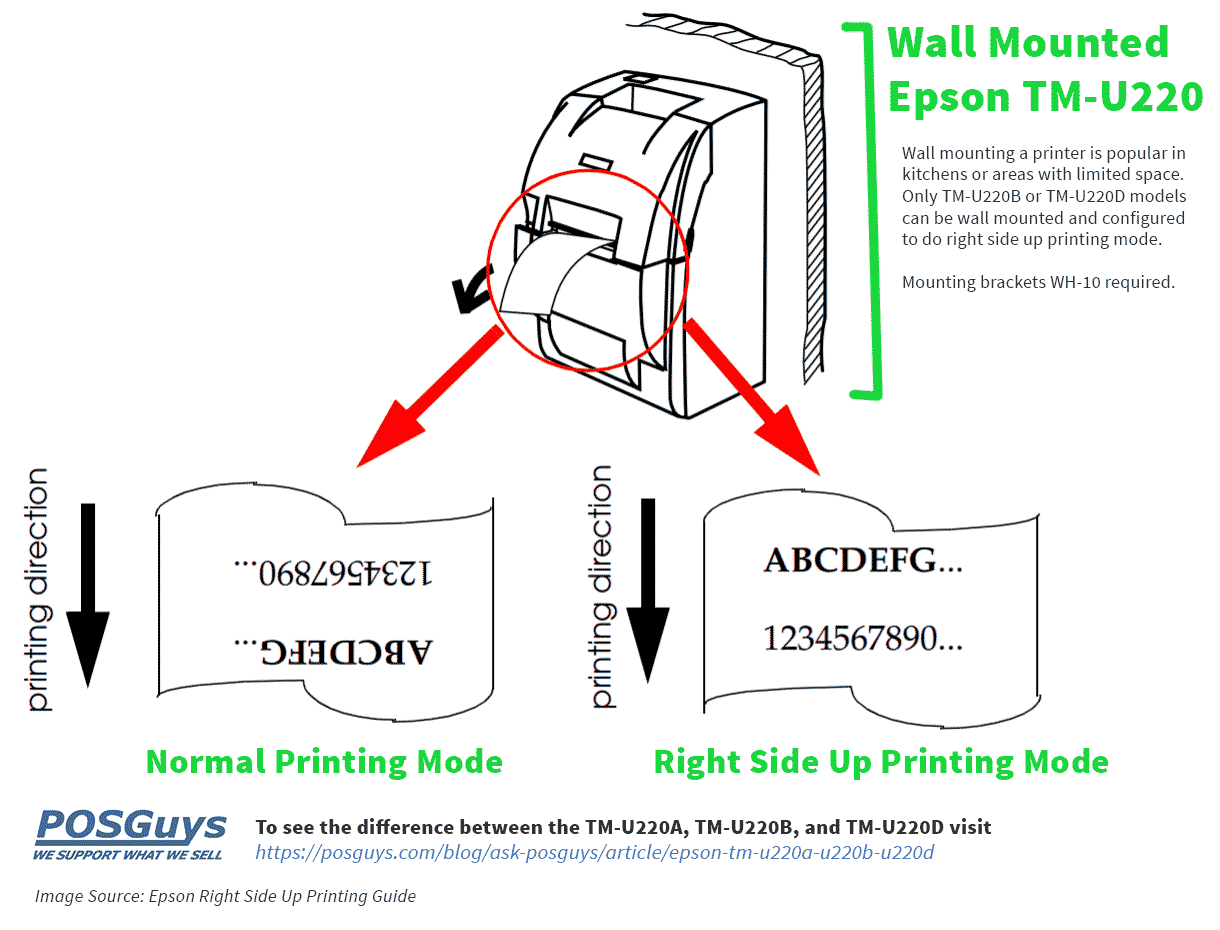
SUMMARY: Model TM-U220A is larger, has a take-up device and can't be wall mounted. Model TM-U220B and TM-U220D are essentially copies of each other except that the D model has no autocutter. (Scroll past the table for additional images of take-up device and wall mounting.)
The table below shows the differences between the three [Epson TM-U220][1] models. Give us a call if you have questions or need help with your purchase. Call 800.903.6571 or email [email protected].
SUMMARY: Model TM-U220A is larger, has a take-up device and can't be wall mounted. Model TM-U220B and TM-U220D are essentially copies of each other except that the D model has no autocutter. (Scroll past the table for additional images of take-up device and wall mounting.)
| Epson TM-U220A | Epson TM-U220B | Epson TM-U220D | |
| Auto Cutter | Yes (Partial Cut Standard, Full Cut Optional *Note that cut must be selected at time of purchase and installed at the factory.*) |
Yes (Partial Cut Standard, Full Cut Optional *Note that cut must be selected at time of purchase and installed at the factory.*) |
No |
| Wall Hanging Install (Right Side Up Printing) | No* | Yes* | Yes* |
| Take Up Device | Yes | No | No |
| Paper Width | 76mm | 76mm / 69.5mm / 57.5mm | 76mm / 69.5mm / 57.5mm |
| Width | 160 mm (6.3") | 160 mm (6.3") | 160 mm (6.3") |
| Height | 157.5 mm (6.2") | 138.5 mm (5.5") | 138.5 mm (5.5") |
| Depth | 286 mm (11.3") | 248 mm (9.8") | 248 mm (9.8") |
| Weight | 2.7 kg (5.9 lb) | 2.5 kg (5.5 lb) | 2.5 kg (5.5 lb) |
| Two Color Printing | Yes | Yes | Yes |
| Ribbons | ERC-38 (B), ERC-38 (P), ERC-38 (B/R) | ERC-38 (B), ERC-38 (P), ERC-38 (B/R) | ERC-38 (B), ERC-38 (P), ERC-38 (B/R) |
| Power Supply | AC adapter, C (standard), PS-180 (multilingual*) | AC adapter, C (standard), PS-180 (multilingual*) | AC adapter, C (standard), PS-180 (multilingual*) |
| Paper Near End Detector | Optional | Optional | Optional |
| Compatible Paper Types | Can print on plain paper and up to two ply carbon roll paper. (original + 1 copy) | Can print on plain paper and up to two ply carbon roll paper. (original + 1 copy) | Can print on plain paper and up to two ply carbon roll paper. (original + 1 copy) |
| * Multilingual models of all types do not have right side up printing. Multilingual means the printer model that can print any one of the following: Japanese Kanji, Simplified Chinese, Traditional Chinese, Thai characters, or Korean characters. | |||
 Purchase any of the [Epson TM-U220][1] models from POSGuys.com and receive free POSGuys support for the life of the hardware. From helping you set it up with your computer to trouble shooting kitchen ticket formatting POSGuys supports what we sell!
Email POSGuys: [email protected]
Call Us Now: 800.903.6571
Purchase any of the [Epson TM-U220][1] models from POSGuys.com and receive free POSGuys support for the life of the hardware. From helping you set it up with your computer to trouble shooting kitchen ticket formatting POSGuys supports what we sell!
Email POSGuys: [email protected]
Call Us Now: 800.903.6571
Blog Sources
Epson User Manual – tm-u220_um_eur_01.pdf Epson TM-U220 Technical Reference Guide – tm-u220_trg_en_std_reve.pdf Guide for TM-U220 Right Side Up Printing – tmu220_rsu_guide_reva.pdf About The Author: Camille Meehan, POSLady since 2011, is the dame to talk to when you've got a printing question. The host of many POSGuys videos she now pulls the strings in the shadows of Ask POSGuys, plotting total global printer domination. She rules over the kitchen printers with an iron ribbon smashing fist, a BA in design, and over eight years print/design experience. Note: Camille does get this TM-U220 question a LOT and for her sanity, this post now exists.[1]: https://posguys.com/receipt-pos-printer_12/Epson-TM-U220_502/