Many businesses be they restaurants or retail locations now use a [computerized POS](http://posguys.com/posguys_advantage.asp) (point of sale) system. It is easy to overlook everything that makes up a typical POS system so lets quickly go over the key parts.
**1). [POS Computer.](http://posguys.com/pos-computer_42/)** The POS computer is the main component and can be either an All-In-One Touchscreen Computer or a small form factor POS computer. Most if not all of the other hardware will be connected to the POS Computer. The POS software will also be loaded on the computer.
**2). [Software.](http://posguys.com/point-of-sale-software_35/)** All computerized POS systems use POS software, there are many options depending on your business. Software drives hardware, this is where a [pre-configured POS system](http://posguys.com/posguys_advantage.asp) can be extremely helpful. Choosing a configured system alleviates the pain of matching your software with compatible hardware.
**2). [Monitor.](http://posguys.com/monitor_34/)** If you are not using an All-In-One touchscreen computer then you will need a standard monitor or a touch screen monitor. Touchscreens are more commonly used in restaurants then in retail locations, but with the popularity of touchscreen phones, tablets and personal computers more and more retailers are choosing the touchscreen option as well.
**3). [Cash Drawer.](http://posguys.com/cash-drawer_32/)** Cashdrawers would seem pretty straight forward but there are many options. Durability, size, color, with or without media slots and connection type are all possibilities. The average business will use a cash drawer that is between 16" and 18" wide and long with a 4" height. There are drawers as small as [13" X 13"](http://posguys.com/cash-drawer_32/MMF-Cash-Drawer-Val-u-Line_487/) and as large as [20" X 21"](http://posguys.com/cash-drawer_32/MMF-Cash-Drawer-Advantage_986/). Most customers will use a printer driven connection type (the cash drawer connects to the back of the receipt printer and the printer triggers the cash drawer to open) but there are also USB, serial, parallel and manual options.
**4). [Printers.](http://posguys.com/receipt-pos-printer_12/)** Regardless of your business type you will need a receipt printer. Thermal printers are what the majority of retailers use now as they are fast, quiet and do not require ribbon. There are multifunction printers as well that can read and validate checks, or print slips. Most restaurants will also have a kitchen printer and sometimes a bar printer too. The majority of kitchen and bar printers are impact printers.
**5). [Barcode Scanner.](http://posguys.com/barcode-reader-scanner_3/)** There are many different types of barcode scanners out there from handheld scanners to in-counter scanner/scales. They all transmit the barcode information to the POS. Barcode scanners are seen more at retail locations then restaurants, but you will find some restaurants that want the barcode scanner option for gift sales etc.
**6). [Card Reader(MSR)](http://posguys.com/magnetic-card-reader_4/).** The MSR (magnetic stripe reader)is used to read employee, gift, loyalty and credit cards. Depending on your configuration you may be using a processing terminal as well or in place of the MSR (for reading credit cards). The MSRs can be stand alone, or many All-In-One terminals have a mountable option.
**7). [Keyboards.](http://posguys.com/point-of-sale-keyboard_33/)** Even a restaurant with a touchscreen will want to keep a keyboard around for data entry, changing the menu, or for back up if the touchscreen interface goes down. For a retail location they are used to enter customers information, money received, etc. There are many different types of keyboards as well, from simple layouts, to programmable options, and even some with build in MSRs.
**8). Back-office Server.** Many business will want a back office server computer where a manager or owner can run reports, enter new products, or change the menu without interfering in day to day business operations.
**9). Other Components.** Along with the core components mentioned above POS systems may include a variety of accessory items like cables, tech support, battery or even data backup. Our POSGuys Complete POS systems include all of the necessary cables, a starter pack of receipt paper, a battery back up unit, as well as one year of tech support and a one year system warranty.
 **1). [POS Computer.](http://posguys.com/pos-computer_42/)** The POS computer is the main component and can be either an All-In-One Touchscreen Computer or a small form factor POS computer. Most if not all of the other hardware will be connected to the POS Computer. The POS software will also be loaded on the computer.
**2). [Software.](http://posguys.com/point-of-sale-software_35/)** All computerized POS systems use POS software, there are many options depending on your business. Software drives hardware, this is where a [pre-configured POS system](http://posguys.com/posguys_advantage.asp) can be extremely helpful. Choosing a configured system alleviates the pain of matching your software with compatible hardware.
**2). [Monitor.](http://posguys.com/monitor_34/)** If you are not using an All-In-One touchscreen computer then you will need a standard monitor or a touch screen monitor. Touchscreens are more commonly used in restaurants then in retail locations, but with the popularity of touchscreen phones, tablets and personal computers more and more retailers are choosing the touchscreen option as well.
**1). [POS Computer.](http://posguys.com/pos-computer_42/)** The POS computer is the main component and can be either an All-In-One Touchscreen Computer or a small form factor POS computer. Most if not all of the other hardware will be connected to the POS Computer. The POS software will also be loaded on the computer.
**2). [Software.](http://posguys.com/point-of-sale-software_35/)** All computerized POS systems use POS software, there are many options depending on your business. Software drives hardware, this is where a [pre-configured POS system](http://posguys.com/posguys_advantage.asp) can be extremely helpful. Choosing a configured system alleviates the pain of matching your software with compatible hardware.
**2). [Monitor.](http://posguys.com/monitor_34/)** If you are not using an All-In-One touchscreen computer then you will need a standard monitor or a touch screen monitor. Touchscreens are more commonly used in restaurants then in retail locations, but with the popularity of touchscreen phones, tablets and personal computers more and more retailers are choosing the touchscreen option as well.
 **3). [Cash Drawer.](http://posguys.com/cash-drawer_32/)** Cashdrawers would seem pretty straight forward but there are many options. Durability, size, color, with or without media slots and connection type are all possibilities. The average business will use a cash drawer that is between 16" and 18" wide and long with a 4" height. There are drawers as small as [13" X 13"](http://posguys.com/cash-drawer_32/MMF-Cash-Drawer-Val-u-Line_487/) and as large as [20" X 21"](http://posguys.com/cash-drawer_32/MMF-Cash-Drawer-Advantage_986/). Most customers will use a printer driven connection type (the cash drawer connects to the back of the receipt printer and the printer triggers the cash drawer to open) but there are also USB, serial, parallel and manual options.
 **4). [Printers.](http://posguys.com/receipt-pos-printer_12/)** Regardless of your business type you will need a receipt printer. Thermal printers are what the majority of retailers use now as they are fast, quiet and do not require ribbon. There are multifunction printers as well that can read and validate checks, or print slips. Most restaurants will also have a kitchen printer and sometimes a bar printer too. The majority of kitchen and bar printers are impact printers.
 **5). [Barcode Scanner.](http://posguys.com/barcode-reader-scanner_3/)** There are many different types of barcode scanners out there from handheld scanners to in-counter scanner/scales. They all transmit the barcode information to the POS. Barcode scanners are seen more at retail locations then restaurants, but you will find some restaurants that want the barcode scanner option for gift sales etc.
 **6). [Card Reader(MSR)](http://posguys.com/magnetic-card-reader_4/).** The MSR (magnetic stripe reader)is used to read employee, gift, loyalty and credit cards. Depending on your configuration you may be using a processing terminal as well or in place of the MSR (for reading credit cards). The MSRs can be stand alone, or many All-In-One terminals have a mountable option.
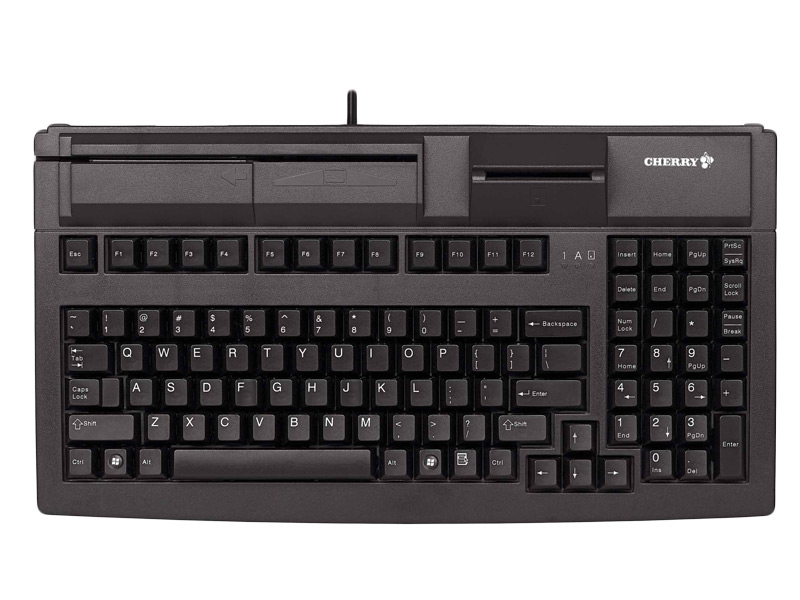 **7). [Keyboards.](http://posguys.com/point-of-sale-keyboard_33/)** Even a restaurant with a touchscreen will want to keep a keyboard around for data entry, changing the menu, or for back up if the touchscreen interface goes down. For a retail location they are used to enter customers information, money received, etc. There are many different types of keyboards as well, from simple layouts, to programmable options, and even some with build in MSRs.
**8). Back-office Server.** Many business will want a back office server computer where a manager or owner can run reports, enter new products, or change the menu without interfering in day to day business operations.
**9). Other Components.** Along with the core components mentioned above POS systems may include a variety of accessory items like cables, tech support, battery or even data backup. Our POSGuys Complete POS systems include all of the necessary cables, a starter pack of receipt paper, a battery back up unit, as well as one year of tech support and a one year system warranty.
**7). [Keyboards.](http://posguys.com/point-of-sale-keyboard_33/)** Even a restaurant with a touchscreen will want to keep a keyboard around for data entry, changing the menu, or for back up if the touchscreen interface goes down. For a retail location they are used to enter customers information, money received, etc. There are many different types of keyboards as well, from simple layouts, to programmable options, and even some with build in MSRs.
**8). Back-office Server.** Many business will want a back office server computer where a manager or owner can run reports, enter new products, or change the menu without interfering in day to day business operations.
**9). Other Components.** Along with the core components mentioned above POS systems may include a variety of accessory items like cables, tech support, battery or even data backup. Our POSGuys Complete POS systems include all of the necessary cables, a starter pack of receipt paper, a battery back up unit, as well as one year of tech support and a one year system warranty.
