We’ve received a lot of questions from software developers lately asking us for our advice on how they should integrate a receipt printer into their POS software. We wanted to get these questions answered by bonafide professionals so compiled all the most commonly-received questions and hosted a Q&A session with Star Micronics, one of the largest receipt printer manufacturers in the industry. Here are the key takeaways from our conversation:
Key Takeaways 1. CloudPRNT is a new offering from Star Micronics that makes it easier for software developers to print directly through a cloud service. It is designed to be simple to implement, versatile, and secure. Servers can be created using any server-side technology that can implement web services, such as PHP, .NET, Node.js, and Python.
2. CloudPRNT was originally developed for online ordering, but it has since been adopted in point-of-sale setups in brick and mortar locations. Its versatility makes it a great choice for many different applications, but native applications may be a better fit for applications that require complete disconnection from the web.
3. You may be able to integrate CloudPRNT and have your existing native print applications work at the same time Depending on how your application is developed.5. Star Micronics offers samples in PHP, NodeJS, .NET SDK, and integration support to make the Cloud print development process easier for software developers. Once integrated, Star can connect ISVs with partners through the Empower Partner Program.
A Transcript of our Conversation Please Note: This conversation's transcript was generated using computer AI. There might be small grammatical errors. Please call us for more information
POSGuys: Hey everybody, this is Colton with POSGuys.com. Today, I have a fun video for us. We've been receiving a lot of calls, emails, and questions from software developers and end-users alike who have heard about a new thing from Star Micronics called Cloud Print. I thought it would be good to go straight to the experts to answer some of those commonly asked questions. So, I have two representatives from Star Micronics' Integration Team on the line. Gentlemen, would you like to introduce yourselves?"
Star (Mark): Yeah, Colton, thank you. My name is Mark Rasho, and I am the Integration Manager here at Star Micronics. We also have one of our Integration Specialists, Oreo, here.
Star (Oreo): Just like Mark mentioned, my name is Oreo Lua, and I'm an Integration Specialist here at Star. I usually work with software developers to make sure that their solutions are properly integrated and that they take the right approach to make things easy for them.
POSGuys: Gentlemen, thank you both for being here. I really appreciate it. So, to start us off here, for those who may not be super aware, Star Micronics' Cloud Print is a relatively new offering, and the whole idea behind it is to allow web-based software developers to more easily connect their software with a cloud printing service for receipt printers. In a brief overview, did I basically describe that right, guys?"
Star: Colton, I would delve a little deeper into it, but like you said, Cloud Print is designed with developers in mind, so they can print through a cloud service as easily as possible. With that in mind, we decided to go with the most common web service, which is HTTP requests. That's the most common thing that every developer knows how to do on a web server, making HTTP requests and handling those requests. Obviously, the print data formats are common data formats, meaning text, image, whatever. So, those are easy formats that everyone is familiar with and can easily generate.
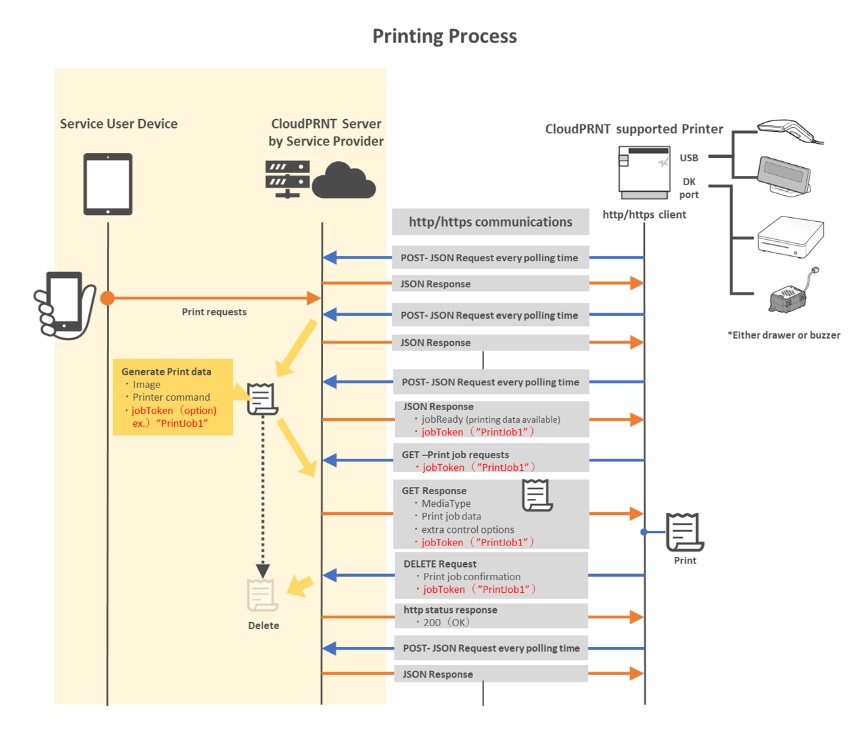
All of Cloud Print's communication can be done with a single URL. That's one of the things with Cloud Print, it communicates over a URL. Whatever IP address the printer has, it doesn't matter, so long as the printer is connected to the network, it can work with Cloud Print. You just need to provide the printer with your server's URL and communication would begin. The printer usually sends an HTTP POST request to your server, and all you need to do is respond to that. In those requests, you can see the status of the printer, whether the cover is open, paper out, all of those statuses. So, you can properly manage the printer as well.
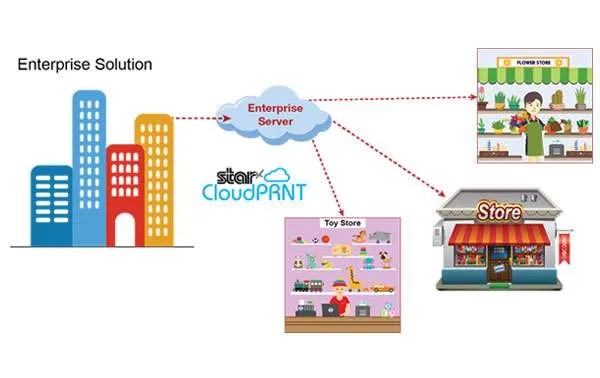
HTTP requests make things easy for everybody. It's a REST API that everyone is familiar with and can reduce development time a lot because everyone's familiar with it already. One thing to note that I almost forgot to mention is that for your server, at the request of most of the developers, you would host your own server. Developers or customers ISVs host their own servers. Star Micronics provides the technology for your server."
POSGuys: Thanks for making that quick little note, that's super important to know for sure. Oreo or Mark, real quick, what languages does your Cloud Print application support?
Star: Good question, Colton. Cloud Print servers can be created using any server-side technology that can implement web services. So, the technology itself is language agnostic, but some of the common programming languages developers are using are PHP, Node.js, and Python. So, those are some of the languages we're seeing, but it's totally agnostic and it's also device-agnostic as well.
POSGuys: Great, thanks for clarifying that. Now that we have gone over very briefly what the actual application is and what it does, I'm interested to hear a little bit about where this type of technology is best used. You know, I see a little bit of it on my side, but I'm interested to hear from the pros here. What are where are you seeing the most traction for this sort of technology coming from in the work that you do every day?
Star: So originally it was developed for online ordering. Um, this way orders can be come from anywhere at any time. The order can be placed by a customer with their cell phone on their computer at home. Uh, and then the printer can be a standalone printer at the business. Um, so there's no need for a tablet or no need to maintain as an SSL certificate at the local level. Um, and we are seeing a lot of adoption in the point of sale setups. In brick and mortars, for example, the order can be placed from a customer's device sitting at, let's say, a restaurant or a kiosk or even behind the counter. Basically, an order can be placed anywhere around the world. It hits the server and then our Cloud Print compatible printers will pull that job and get the order received and originally started for online ordering but it's being used for everything right now."
POSGuys: Okay, yeah. So it sounds like it's been a super useful application for some of the applications that we're seeing that have become a lot more popular over the last couple years. When might another development approach make more sense, though? Because I get the feeling that this might not be for everybody and for every use case."
Star: Uh, yeah. You are right about that. Uh, so although Cloud Print is very versatile like Mark mentioned was initially for online ordering but now you see point of sale companies using those as well. Uh, so yes, Cloud Prints can almost work in every scenario right, but depending on the applications, like everyday use case like for online ordering, it's perfect, right? But for example, uh, if you're more so security conscious in the sense that, okay, like it's a government application, right, and they want to be totally disconnected from the internet, all right, then that's not the right approach because the printer would has internet access. Right, but some government agencies don't want anything connected to the internet, right? So for a situation like that, Cloud Print might not be the best approach. I'll take for example, uh, your application is for like a library where you check out books, right? You don't need a Cloud Print application for that because you probably have a computer that they're using, they scan the book, and then prints or whatever ticket so you know that okay these are the books you rented from the library stuff like that. You don't really need uh internet access for or web-based application for. You can easily do that with a native application. So it all kind of depends on what the everyday use case for this application is and what requirements like okay the customer has exactly right? And obviously, uh, we always say reach out to Star or POS guys that will get you connected with us and we can go over the entire scope of the project. See okay this is the best path forward for your for the application you have in mind right? So we're always available to help get things uh running the right way."
POSGuys: Yeah, thanks for bringing it up. Yeah, it's this type of thing that is really complicated, you know, or seems to be, right? Especially if you don't kind of have the depth of knowledge to handle it. So, you hit the head on the nail, you know, hit the nail on the head there, so to speak. Definitely give us a call, you know, if this is kind of going over your head a little bit, or you still have some open questions."
Um, but kind of transitioning to a question that I get a ton, and actually I could probably count three or four times that I've gotten this in the past week actually. Um, I'm getting a lot of calls and a lot of questions from ISVs who have an existing solution. So, let's say they're a developer, you know, they have a piece of software that they've already developed with an existing printing solution, and they have customers who've already bought a receipt printer for it. You know, so maybe they're using a cloud printing service for whatever manufacturer, or they're using something like Apple AirPrint, or maybe it's a native application, right? They're just building off, like, a Windows print driver, but they want to add this on. It's like an additional option to streamline things, to make it a little bit easier, but they don't want to alienate those existing customers, you know, and have them buy new receipt printers or change their whole setup. If you integrate a cloud print setup, is it possible to kind of have both run in parallel so you can kind of use either or?"
Star: Uh, yes. So, most of our Cloud Print-- I mean, all of our cloud-compatible printers actually, uh, can run with native applications as well concurrently, right? So, the printer can be working with Cloud Print and also get native print jobs right, connected to, like, a computer via USB or connected via Bluetooth if you have one of the higher-end models that have Bluetooth and Cloud Print. So, they can communicate with all of those ports at the same time, right? So, you can use Cloud Print and a native application. But I think, like I said before, it all depends on the scenario or the requirements by the customer, right? Uh, so yes, the best thing to do would obviously be to discuss with us to see, okay, is Cloud Print really necessary as an add-on for your application. If it is necessary, we'll find a way to get it done for you because it can be done, right? So, it all depends on how much, you know, time and effort we want to put into it at the moment, right? Because sometimes, you know, things can come up and projects have to be properly, like, create a proper timeline for projects. So, if you reach out to us, we'll work with you to make sure that okay, Cloud Print can be done and this is how long it's going to take or whatever, and we'll work with you to make sure that okay, the solution you have in mind we can bring it to life."
POSGuys: Okay, so you said that you know they can work with you all to sort of help streamline that process, you know, and you noted that you can kind of work with them to figure out the best implementation approach. What are some of the other ways that you know Star can make the development process easier? What does that practically look like?"
Star: Yeah, Colton. So, one of the ways we offer samples in PHP and node.js, uh, net SDK, whatever the customer is using. By reaching out to the integration team here at Star, we'll provide you the correct SDK, the correct samples, support, uh, with a demo unit for testing. So, basically what we do, we support throughout the entire process. You reach out to us, an integration specialist like Oreo will be able to support, and, and you run into any hiccups, any questions, you get stuck, we're there, we're gonna walk you through it and make sure you get integrated and make sure you're good to go. So that's what we're, you know, Star Micronics integration team does. We're the experts, we do this a lot, so we really want the ISV to reach out to us at any time for any questions because we know our way around this and we can make it a lot easier for the ISV. And I can personally, for the people watching, I can personally vouch for these guys. You know, I've watched a number of ISVs and franchises sort of down this road, and they've been really good from start to finish and have sort of answered all the questions that I couldn't answer, and if kind of, you know, we've made a good team in that regard. So, definitely can vouch for that."
POSGuys: Let's say that a developer comes to you all and is interested in jumping on with Cloud Print, you know, what do they need to do to get started and roughly how long does the average setup typically look like, you know, from a timeline perspective?"
Star: The timeline kind of varies with each integration in the sense that we need to consider, okay, is this a project that's a high priority project for you, the ISV? Some ISVs have different projects that they're taking on at the same time, and if this is a project that's scheduled for release say in Q4 of a year, then we know to them it's not really high priority. So, it might look like it took a long time for them to implement Cloud Print, but just on their list of priorities it wasn't at the top of their priority. Yes, we will still work with you even if you say, "Oh, this is something you're looking to develop for next year." We'll still offer our support to make sure that you have all that you need. It all kind of depends on the developer's skill level and as well as the timeline that they've set for themselves to get the project finished. I think the fastest turnaround time I've seen with cloud prints was probably like two days or so. We had a developer reach out to us, let's say today, and by two days later, he was done integrating and was able to print and all of that, he had all of that set up. So, it's a pretty easy technology to implement.
Right, most web developers are familiar with the HTTP posts and get requests, so they're familiar with that already. They can easily handle those requests from the printer because that's all you're really doing. The printer is communicating and you're responding to it. Back and forth communication, just make sure you're handling that communication properly and yeah, you'll be able to get things up and running as soon as you want to really. As much effort as you put in to get it up and running, you'll get things going, and we're able to offer demo units right to make sure that if you don't have a printer to start with, we'll gladly send you a printer so you can get things up and running as soon as possible. Then also, the cloud print technology is totally free, so it's not like you need to consider a cost or whatever compared to a different solution. All of those barriers are not there, so if you don't have a printer, we'll send you one and it's completely free, so you'll be able to get things up and running as soon as possible.
POSGuys: So then it sounds like then the only sort of cost would be associated with this is, you know, of course, the labor, but then also, you know, whatever the cost is for running your web server, and if you're already developing a cloud-based application, you know, that's already a given, you're going to have it regardless, so yeah, that's a really good point. Thanks for bringing that up. The second part is actually sourcing the printers that are capable of running the cloud print and then getting them into the hands of your end-users, and Star's been really good from a supply chain perspective about making those printers available. But of course, it can be an involved process from start to finish to get those printers into the hands of your end-users and set up and ready to go, and that's where my company would come in. Once you sort of get that process integrated and get cloud print up and running, then we could then come in and sort of help with the actual distribution of the product itself and sort of that aftercare support, and that's sort of what we specialize in. So working with us, working with Star, we can make the whole process super easy for you. So with that, that basically wraps up the major questions that I get from developers. So with that, yeah, I think this is a good time for us to depart ways. Thank you all so much for being with me. I really appreciate it. It's been a super enlightening conversation."
[1]: https://posguys.blob.core.windows.net/content/images/blog/79004/QAVideo.jpg