Choosing a Version
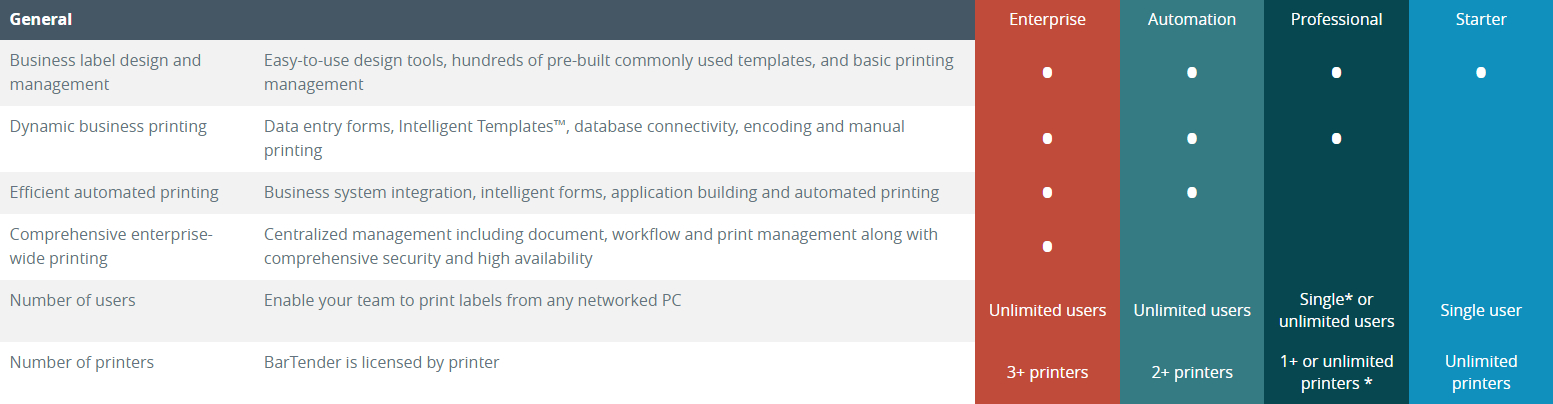
BarTender comes in several tiers: Starter, Professional, Automation, and Enterprise. Depending on how and what you need to print, how many printers you have, and how many stations and users require access to printing, the version you need will vary. Below, we break down the differences between the versions. Further on, we will break down the licensing structure once you’ve determined which software version is right for you.
Starter
Ideal for individuals who need to quickly and easily generate labels, including support for dynamic variable data from databases like Excel or CSV files.
Professional
Includes all the features of the Starter Edition. Ideal for small businesses and departments, the BarTender Professional Edition includes secure internet printing, data entry forms, RFID encoding, and the ability to link content from databases, spreadsheets, and other files. It also includes an industry-leading Designer for sophisticated label and card designs.
Automation
Includes all the features of the Professional Edition. Ideal for businesses looking to automate labeling to increase speed and accuracy, the BarTender Automation Edition provides tools to manage and integrate label and document printing with the organization’s business systems.
Enterprise
Includes all the features of the Automation Edition. BarTender Enterprise Edition provides comprehensive enterprise-wide printing with centralized management, workflow orchestration, revision control, auditing, web and mobile printing, high availability, and enhanced security. Ideal for businesses that operate in regulated industries or span multiple locations and need to control design and printing throughout the organization.
Choosing a License Structure
When purchasing a BarTender license, you have a few choices for structuring your license, depending on your business type.
Please note that this information applies to BarTender Starter, Professional, Enterprise, and Automation editions. BarTender Cloud has a different licensing structure.
Workstation License
A Workstation license, available for BarTender Starter and Professional, supports unlimited printers per license but only allows a single user from a single PC or BarTender installation. The printers can be connected to a local computer or anywhere on a network. Workstation licenses can be purchased as either a yearly subscription or on a month-to-month subscription.
Application License
An Application license, available for BarTender Professional, Automation, and Enterprise editions, supports unlimited users but limits the number of supported printers based on the license you select (typically 2, 5, or 10 printers). Some Application licenses offer unlimited printer support. Application licenses can be purchased as either an annual license or on a month-to-month subscription.
Printer License
A Printer license allows you to pay an additional fee to attach extra printers to a new or existing application license. There is no limit to the number of additional printers you can attach to an application license. Printer licenses require an additional support license when first purchased.
Support and Maintenance
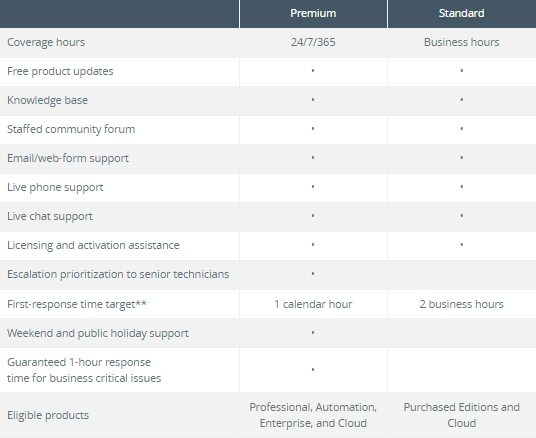
Most BarTender licenses come with BarTender’s standard maintenance and support for the duration of the original software license (usually 1, 3, or 5 years). Monthly Workstation and Application licenses include this support as part of the monthly fee. This support license grants you access to BarTender’s support team, free software upgrades, and makes it easier to transfer your licenses between different computers. BarTender also offers a premium support tier, which includes 24/7 support as an upgradeable add-on. A complete list of features can be found in the table below.
If your support license has expired and you want to upgrade to a newer version of BarTender, you will need to pay a discounted pro-rated monthly charge for the lapsed time, plus a license activation fee. This pro-rated charge also applies if you wish to renew support after it has lapsed. There is a 90-day grace period after your support expires during which you can renew without penalty.
All tiers offer the option to upgrade from Standard Support to Premium Support.
2024 Renewal Guide for Legacy Customers
Expired Maintenance and Support
Any printer add-ons or edition upgrades made in the 12th month or renewal expiry month for the original application license will require a complete renewal of all application and printer licenses for at least one (1) year of Maintenance and Support.
For example, if you have a BarTender Enterprise 50-printer license and want to reduce your printer count to 45, you will need to renew your Maintenance and Support at the 50-printer count level before removing the 5 printer licenses. If you need to add those 5 printer licenses back in the future, you will need to repurchase them.
Grace Period
Customers have a 90-day grace period after their support contract expires. Within this period, they must purchase at least one year of new Maintenance and Support. The starting date of the new renewal will be the original expiration date, and the renewal will expire accordingly.
Outside of the 90-Day Grace Period
Customers who have not renewed their support within 90 days of expiration must purchase at least one year of new Maintenance and Support, along with monthly Reactivation Maintenance and Support, which incurs a 25% penalty for the time their agreement was expired. The starting date of the new renewal will be the date of the new purchase, and the renewal will expire accordingly.
For example, with BarTender Starter:
BTS-APP-BPMNT: BarTender Starter - Application License - Reactivation Expired Standard Maintenance and Support (Per Month)
BTS-PRT-BPMNT: BarTender Starter - Printer License - Reactivation Expired Standard Maintenance and Support (Per Printer Per Month)