The TLDR for Busy Decision Makers
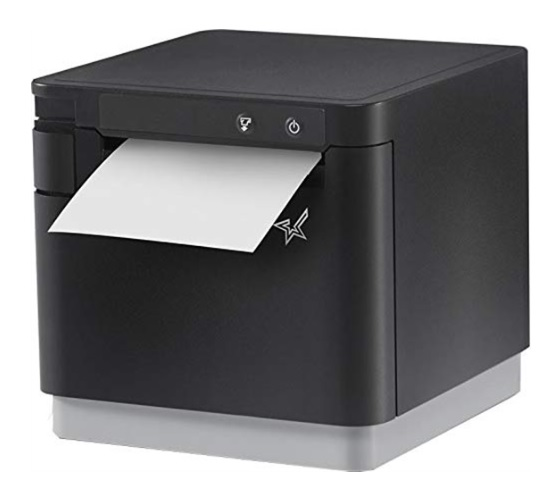
Star Micronic’s has released the next generation of their popular mC-Print3 line of printers. The upgraded printer line — a popular option for mobile tablet-based POS systems — features a host of upgrades and new features that better equip it for busy retail and restaurant locations. These include:
-
50% higher printing speeds - bringing the printer up to 15 inches/second, the fastest in their catalog.
-
Doubled the reliability of the print head so you can print 124 miles of receipts before it might break.
-
Improved Bluetooth communication speeds and upgrades to the speed of their CloudPRNT service.
-
The ability to connect an external USB hub to the printer for greater peripheral support options.
These new features are in addition to the first generation's ability to charge your tablet and provide an internet connection via USB-C or Lightning. The latest generation is backward compatible with most POS software* that supports the 1st Generation models and can use the same accessories (power supplies excluded). Star will continue to support the older models but is slowly phasing out the sale of older SKUs.
The second generation is a worthy upgrade if you’re in the market for a new printer, especially if you’re looking for something more robust and quicker. If you’re a developer looking to integrate a new printer into your software, this is a printer we’d put high on the list of options.
*Star Micronics has confirmed that the new model shares the same Bluetooth certifications. Even so, it’s always best to verify with your software developer before purchasing a new printer that may not be on their hardware compatibility list.
High-Level Changes
Let’s cover the big picture first. Probably the most significant difference between the first and second generation is that they’ve upgraded the print speed. The new generation prints at 15.7”/second compared to the first generation’s 9.8”/second. This is a 50% speed increase, making it Star’s fastest printer and one of the fastest in the industry — at least among major name-brand manufacturers.
On a related note, they’ve also increased the reliability on the printhead. The old model could print about 62 miles of receipt paper before breaking. The new model touts a 124 mile lifespan. This means that if you printed one long receipt, it could stretch from the Liberty Bell in downtown Philidelpia all the way to the front yard of the White House. And with the 15” per second print speed it would only take 145 hours to print!
These changes — and the rest we’ll mention in this article — are only available on the second generation. Star will continue to support the older generations and is slowly phasing them out in favor of the new models, so you’ll see them hanging around for a bit. Because of this, if you’re looking to upgrade, ensure that you’re ordering a model that has the “MCP31” in the product name and not “MCP30”.
Upgraded Wireless Communication & Features
But printing isn’t the only speed upgrade. The new models feature an upgraded Bluetooth chip, making them communicate twice as fast as the first-generation model. According to Star, even though the models have a new Bluetooth chip, they have the same certifications, so the new model should be compatible with any software that has already integrated the first-generation models of the mc-Print3.
Developers should also be interested in the fact that the new models are the first to support Star’s new “CloudPRNT Next” technology, which should provide faster and more reliable communication between devices. The technology is built around an MQTT protocol rather than traditional HTTP polling.
Star has continued to support its SteadyLAN technology on the WiFi end of things. This lets you share the hardwired Ethernet connection from your receipt printer with your Android and iOS device using a lightning or USB-C connection. This is handy in places where WiFi is unstable. One of the most common support calls we receive is from folks having trouble keeping their printers connected over WiFi, so this feature is an excellent step in the right direction.
In addition to sharing your network communication, the Lighting and USB-C ports can also communicate with the printer, of course, but also provide power to the tablet, replacing the need for a dedicated charger. So you’re getting two birds with one stone. It can push 20W of power on the USB-C model.
New External Hub Support & Additional Sensors
Keeping on the topic of communication ports, one interesting thing about this new model is that Star has built-in support for an external hub. This allows users to connect a USB hub to the printer’s USB-A port and pair it with multiple peripherals, such as barcode scanners, scales, and customer displays, through the additional USB ports. Star has confirmed that there were no specific requirements for the external hub. For the peripherals to send or receive any information, your software needs to be integrated with the function, so make sure you reach out to your developer if you’re interested.
The new model comes with two new sensors. One is a paper near-end sensor that can alert someone if their paper is almost out if the POS software supports it. The previous generation only had a paper-end sensor. The new model also comes with a Cash Drawer Detector sensor, which can help support teams when troubleshooting. That’s not something the average user will use, but it’s helpful for teams doing large device rollouts.
Accessory Support Overview
Many of the accessories are backward compatible. The big one is that the new model uses a new power supply, so you should probably stop using your older power supplies.
-
mC-Sound Kitchen Buzzer with 16 programmable sounds
-
Wall Mount Bracket
- Wireless LAN Module
Plastic-Free Packaging - Finally!
We must give Star some kudos because they’ve eliminated almost all the plastic in their packaging. The only bit of plastic is a little cap for a power supply cable, but other than that, everything else is paper. That might not seem like a big deal, but in my experience, the point-of-sale industry is notorious for cramming as much plastic as possible into their packaging. So kudos again to Star, and I hope they continue that for all their models moving forward, and I hope other manufacturers take notice.
What’s Stayed the Same
Other than the things mentioned above, the printers are similar otherwise. The first and second-generation models feature 3” wide printing with the option to do 2.2” printing with an included plastic spacer. They’ll come with your standard set of device connection options—Ethernet, WiFi, Bluetooth, USB, and lightning. You’ll have the option of either a black or white model.
In Conclusion - Should You Upgrade?
In conclusion, Star did a good job on this one. We’re impressed with the print speed — it’s a pretty sizable increase, especially since this isn’t a proper new product launch as much as it is updating an existing line. It’s clear that they’ve worked hard to pack in a lot of improvements on this unit. It took the Mc-Print3 from being a pretty middle-of-the-pack printer in the industry to something that should be included near the top of the rankings.
Sometimes, manufacturers roll out new lineups of printers without changing anything that would provide value to the end user, but I don’t think that’s the case here. I think both end users and software developers will find a lot of value here — we have to give them kudos. If you’ve been using the older mc-Print3 for a while now and it’s working fine, you probably don’t need to go out of your way to upgrade the printer. But if you’re looking for something more robust and quicker, this is a solid option and well worth the upgrade. And if you’re a developer looking to integrate a new printer for your software, this is a printer I’d put high on your list of options.